必要なもの
- AWSアカウント
- AWS CLI(設定済み)
環境
- macOS
Claude初期セットアップ
ターミナルでClaude Codeをインストールしましょう。
curl -fsSL https://claude.ai/install.sh | bashSetting up Claude Code...
✔ Claude Code successfully installed!
Version: 2.0.76
Location: ~/.local/bin/claude
Next: Run claude --help to get started
⚠ Setup notes:
• Native installation exists but ~/.local/bin is not in your PATH. Run:
echo 'export PATH="$HOME/.local/bin:$PATH"' >> ~/.zshrc && source ~/.zshrc
Installation complete!echo 'export PATH="$HOME/.local/bin:$PATH"' >> ~/.zshrc && source ~/.zshrcAmazon Bedrockの設定
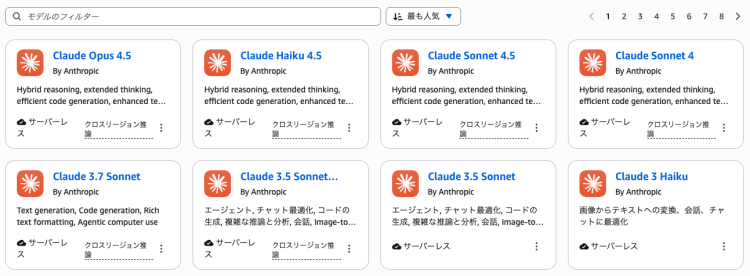
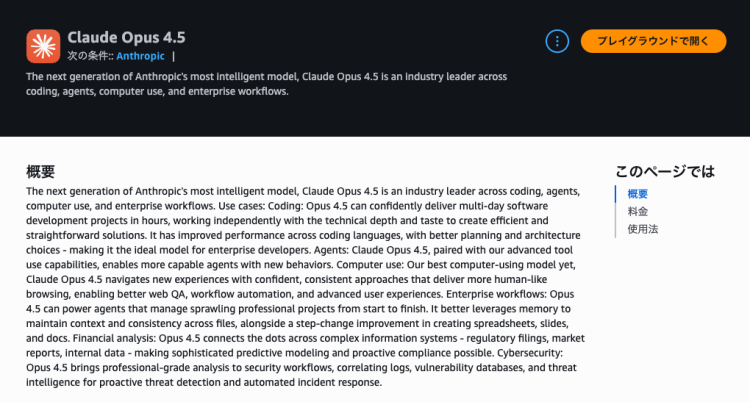
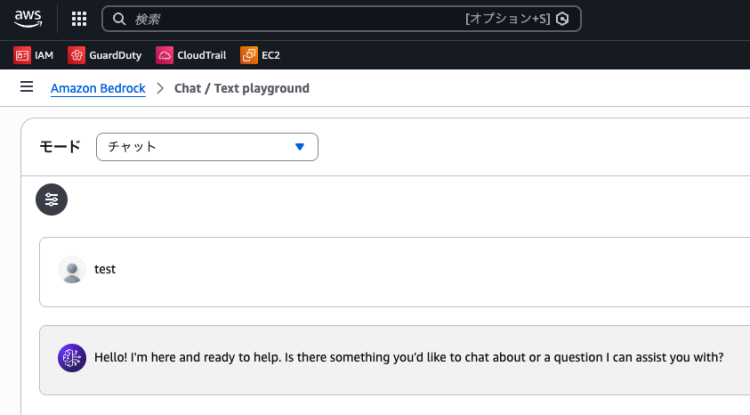
以前はモデルアクセス許可が必要でしたが、モデルに対してリクエストを行うと自動で許可されるように変わりました。いずれかのモデルでプレイグラウンドを開いてチャットするとモデルアクセスが自動的に許可されるようです
Claude Codeの設定が完了するとSonnet 4.5とHaiku 3.5に対してリクエストを行うため、たぶん↓は飛ばしても大丈夫です。
AWSコンソールにサインインしてBedrockにアクセスし、Claude(任意のバージョン)を選んでプレイグラウンドを開きましょう。
ターミナルの設定
export CLAUDE_CODE_USE_BEDROCK=1
export AWS_REGION=us-east-1
ClaudeがBedrockに提供するデフォルトのプライマリモデルは global.anthropic.claude-sonnet-4-5-20250929-v1:0、小型/高速モデルは us.anthropic.claude-haiku-4-5-20251001-v1:0 です。(2026年1月時点)
意図しないコストを発生させないためにも出力設定はしておきましょう。
Claudeが推奨する出力トークン設定は次のとおりです。
export CLAUDE_CODE_MAX_OUTPUT_TOKENS=4096
export MAX_THINKING_TOKENS=1024CLAUDE_CODE_MAX_OUTPUT_TOKENS=4096: Bedrockのバーンダウン制限ロジックは、max_tokenペナルティとして最低4096トークンを設定します。これを低く設定してもコストは削減されませんが、長時間のツール使用を遮断し、Claude Codeエージェントのループが持続的に失敗する原因となる可能性があります。Claude Codeは通常、拡張思考を行わない場合4096出力トークン未満を使用しますが、大規模なファイル作成やWriteツール使用を伴うタスクではこの余裕が必要となる場合があります。MAX_THINKING_TOKENS=1024: ツール使用応答を遮断せずに拡張思考のための余地を提供しつつ、集中した推論の連鎖を維持します。このバランスにより、特にコーディングタスクにおいて必ずしも有益ではない軌道変更を防ぐのに役立ちます。- 引用: https://code.claude.com/docs/en/amazon-bedrock
IAMポリシー
Claudeのドキュメントによると、コストの追跡とアクセス制御を簡素化するために、Claude Code専用のAWS アカウントを作成することをおすすめしています。
{
  "Version": "2012-10-17",
  "Statement": [
    {
      "Sid": "AllowModelAndInferenceProfileAccess",
      "Effect": "Allow",
      "Action": [
        "bedrock:InvokeModel",
        "bedrock:InvokeModelWithResponseStream",
        "bedrock:ListInferenceProfiles"
      ],
      "Resource": [
        "arn:aws:bedrock:*:*:inference-profile/*",
        "arn:aws:bedrock:*:*:application-inference-profile/*",
        "arn:aws:bedrock:*:*:foundation-model/*"
      ]
    },
    {
      "Sid": "AllowMarketplaceSubscription",
      "Effect": "Allow",
      "Action": [
        "aws-marketplace:ViewSubscriptions",
        "aws-marketplace:Subscribe"
      ],
      "Resource": "*",
      "Condition": {
        "StringEquals": {
          "aws:CalledViaLast": "bedrock.amazonaws.com"
        }
      }
    }
  ]
}
Claude Codeの設定
cd /path/to/project
claude
Welcome to Claude Code v2.0.76
…………………………………………………………………………………………………………………………………………………………
* █████▓▓░
* ███▓░ ░░
░░░░░░ ███▓░
░░░ ░░░░░░░░░░ ███▓░
░░░░░░░░░░░░░░░░░░░ * ██▓░░ ▓
░▓▓███▓▓░
* ░░░░
░░░░░░░░
░░░░░░░░░░░░░░░░
*
▗ ▗ ▖ ▖ *
*
………………… ………………………………………………………………………………………………………………
Let's get started.
Choose the text style that looks best with your terminal
To change this later, run /theme
❯ 1. Dark mode ✔
2. Light mode
3. Dark mode (colorblind-friendly)
4. Light mode (colorblind-friendly)
5. Dark mode (ANSI colors only)
6. Light mode (ANSI colors only)
╌╌╌╌╌╌╌╌╌╌╌╌╌╌╌╌╌╌╌╌╌╌╌╌╌╌╌╌╌╌╌╌╌╌╌╌╌╌╌╌╌╌╌╌╌╌╌╌╌╌╌╌╌╌╌╌╌╌╌╌╌╌╌╌╌╌╌╌╌╌╌╌╌╌╌╌╌╌╌╌╌╌╌╌╌╌╌╌╌╌╌╌╌╌╌╌╌╌╌╌╌╌╌
1 function greet() {
2 - console.log("Hello, World!");
2 + console.log("Hello, Claude!");
3 }
╌╌╌╌╌╌╌╌╌╌╌╌╌╌╌╌╌╌╌╌╌╌╌╌╌╌╌╌╌╌╌╌╌╌╌╌╌╌╌╌╌╌╌╌╌╌╌╌╌╌╌╌╌╌╌╌╌╌╌╌╌╌╌╌╌╌╌╌╌╌╌╌╌╌╌╌╌╌╌╌╌╌╌╌╌╌╌╌╌╌╌╌╌╌╌╌╌╌╌╌╌╌╌
Syntax theme: Monokai Extended (ctrl+t to disable)↑または↓でカラースキームを選びましょう。
ここでは 1. Dark mode を選びました。
Use Claude Code's terminal setup?

 For the optimal coding experience, enable the recommended settings
 for your terminal: Option+Enter for newlines and visual bell

 ❯ 1. Yes, use recommended settings
   2. No, maybe later with /terminal-setup

Enter to confirm · Esc to skip↑または↓でセットアップ方法を選びます。1. Yes, use recommended settingsを選びましょう。
─────────────────────────────────────────────────────────────────────────────────────────────────────────────────────────────────────────────────────────────────────
 Do you trust the files in this folder?

 /Users/username

 Claude Code may read, write, or execute files contained in this directory. This can pose security risks, so only use files from trusted sources.

 Learn more

 ❯ 1. Yes, proceed
   2. No, exit

 Enter to confirm · Esc to cancel
1. Yes, proceedを選びます。usernameは手元の端末のユーザーです。
╭─── Claude Code v2.0.76 ────────────────────────────────────────────────────────────────────────────────────────────────────────────────────────────────────────╮
│                                    │ Tips for getting started                                                                                                  │
│            Welcome back!           │ Run /init to create a CLAUDE.md file with instructions for Claude                                                         │
│                                    │ Note: You have launched claude in your home directory. For the best experience, launch it in a project directory instead. │
│            * ▗ ▗   ▖ ▖ *           │ ───────────────────────────────────────────────────────────────────────────────────────────────────────────────────────── │
│           *             *          │ Recent activity                                                                                                           │
│            *   ▘▘ ▝▝   *           │ No recent activity                                                                                                        │
│                                    │                                                                                                                           │
│   Sonnet 4.5 · API Usage Billing   │                                                                                                                           │
│            /Users/username         │                                                                                                                           │
╰────────────────────────────────────────────────────────────────────────────────────────────────────────────────────────────────────────────────────────────────╯

  /model to try Opus 4.5. Note: you may need to request access from your cloud provider

─────────────────────────────────────────────────────────────────────────────────────────────────────────────────────────────────────────────────────────────────────
>
─────────────────────────────────────────────────────────────────────────────────────────────────────────────────────────────────────────────────────────────────────
  ? for shortcuts
設定はこれでおしまいです。
Are you Missing API Key?
毎回APIキーがないと言われますか?チャットすれば動くと思いますが、もし気になるようなら再度設定しておきましょう。以下が有効です。
echo 'export CLAUDE_CODE_USE_BEDROCK=1' >> ~/.zshrc
source ~/.zshrc
参考
最後に
前回に続き、AIコーディングの環境を整えてみました。使った感じもレビューしたいと思います。
ここまで読んでいただき、ありがとうございます。もしこの記事の技術や考え方に少しでも興味を持っていただけたら、ネクストのエンジニアと気軽に話してみませんか。
- 選考ではありません
- 履歴書不要
- 技術の話が中心
- 所要時間30分程度
- オンラインOK